WDX-180
Web Development X
Week 31 | Advanced JavaScript

Week 31 - Day 1 | Object Constructors & Object Instances
Schedule
- Watch the lectures
- Study the suggested material
- Practice on the topics and share your questions
Study Plan
Your instructor will share the video lectures with you. Here are the topics covered:
- TypeScript, Objects Constructors & Instances
You can find the lecture code here and the diagram here.
References & Resources:
- Object.hasOwn()
- Introduced in ES2022
- …and not available before that
- Pretty TypeScript Errors
- For private methods/properties we can use:
- the private keyword in TypeScript
- the
#hash character in JavaScript
Lecture Questions:
- Property
hasOwndoes not exist on typeObjectConstructor. Do you need to change your target library? Try changing thelibcompiler option toes2022or later.Object.hasOwn(pet,"run")😰 pet.hasOwnProperty("run")
- SO: Property ‘assign’ does not exist on type ‘ObjectConstructor’- Are static methods/properties the same as private methods/properties?
- No
- What is an instance?
- Any object created using the new keyword. The object is always an instance of the Class or Function Constructor that created it.
Exercises
- Study: instanceof
- Study: Sparse Arrays (vs Dense Arrays)
- Also follow and read this blog and his books, articles and videos
- Study private properties
- Investigate (more) on the difference between: if ( obj.prop ) and if ( “prop” in obj )
- “A property may be present in an object but have value undefined. Therefore, x in obj is not the same as obj.x !== undefined.” ~ The in operator @ MDN
- Try the following:
- Create a class (e.g. Cat, Fish) and/or constructor and then create instances of Cat and Fish (e.g. siameseCat) and try using the object instanceof Cat check.
-
Study: Array Constructor
- Start this TypeScript course
IMPORTANT: Make sure to complete all the tasks found in the daily Progress Sheet and update the sheet accordingly. Once you’ve updated the sheet, don’t forget to commit and push. The progress draft sheet for this day is: /user/week31/progress/progress.draft.w31.d01.csv
You should NEVER update the draft sheets directly, but rather work on a copy of them according to the instructions found here.
Week 31 - Day 2 | Expenses Chart Challenge
Schedule
- Study the suggested material
- Practice on the topics and share your questions
Study Plan
Study the following TypeScript concepts and then scroll down
to the Exercises section to start your Frontend coding challenge.
-
Try TypeScript with ts-node, a TypeScript execution engine and REPL for Node.js.
Exercises
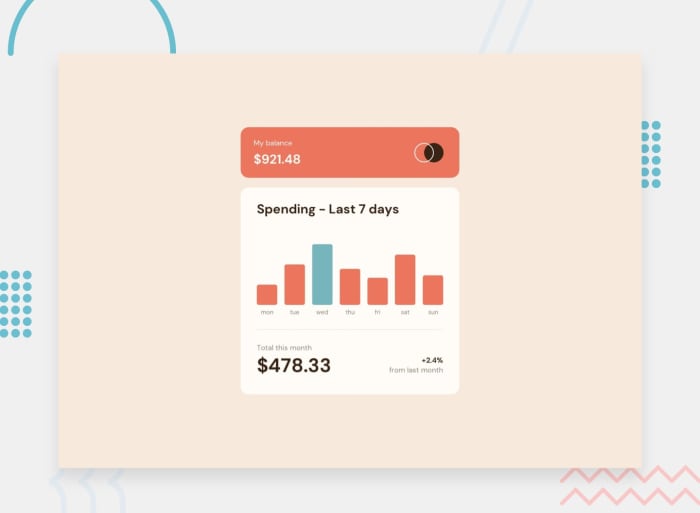
Time for a Frontend coding challenge!
In this challenge, you’ll create a bar chart component from scratch.
Visit the Frontend Mentor web page and start hacking!
You can also download the exercise resources and instructions here.
IMPORTANT: Make sure to complete all the tasks found in the daily Progress Sheet and update the sheet accordingly. Once you’ve updated the sheet, don’t forget to commit and push. The progress draft sheet for this day is: /user/week31/progress/progress.draft.w31.d02.csv
You should NEVER update the draft sheets directly, but rather work on a copy of them according to the instructions found here.
Week 31 - Day 3 | Object Wrappers, Falsy Values & Sets
Schedule
- Watch the lectures
- Study the suggested material
- Practice on the topics and share your questions
Study Plan
Your instructor will share the video lectures with you. Here are the topics covered:
- Primitive Objects
- Object Wrappers, Falsy Values & Sets
You can find the lecture code here and the diagrams here.
References & Resources:
- Bookmarks you MUST have as a JS developer:
- typeof (unary) operator always returns a string
- If you need to go past the Number.MAX_SAFE_INTEGER, use the BigInt notation:
- Instead of:
(9007199254740991+1) === (9007199254740991+2) === true??? - Do this:
(9007199254740991n+1n) === (9007199254740991n+2n)- turn Number(s) into BigInt(s) by placing the n at the end of the number
- Instead of:
- With floating point numbers (aka decimals), be extra careful.
- Consider using a library like decimal.js or big.js
- Use the _ notation for large integers: 10_000_000
- 0/-0 are the only falsy number values (When coerced to a Boolean they produce false)
- “” empty string is the only falsy String value (when coerced to a Boolean it produces false)
- Value type conversion can happen in 2 ways:
- Explicitly: String(5);
- Implicitly: 5 + “”; => “5”
- Another example: if/while/switch/dowhile
- if ( 5 ){ … } => if ( 5 => Boolean(5) => true ){ … }
- You will probably never have to deal (or find) Object Wrapped Primitives in any codebase.
- When ES6 came out (?) a bunch of new objects were introduced:
- Set
- WeakSet
- Map
- WeakMap
- Special kind of Arrays: Indexed Collections (mainly for working with binary data)
- Some Constructor Functions can be used without the new keyword:
- Date(), new Date(), Error(), new Error()
- Others are pretty strict and will throw an Error
- Promise, Set, etc.
- Others are completely forbidden (illegal constructors)
- new HTMLElement() will throw an error
Exercises
Study Guide
- Discover Set(s) and its methods:
values()(similar to Object.values())keys()(similar to Object.keys())entries()(similar to Object.entries())forEach()- Try using Sets with Object references
- Try and google for an introductory video on Math and Set Theory
IMPORTANT: Make sure to complete all the tasks found in the daily Progress Sheet and update the sheet accordingly. Once you’ve updated the sheet, don’t forget to commit and push. The progress draft sheet for this day is: /user/week31/progress/progress.draft.w31.d03.csv
You should NEVER update the draft sheets directly, but rather work on a copy of them according to the instructions found here.
Week 31 - Day 4 | Expenses Chart - React Twist
Schedule
- Study the suggested material
- Practice on the topics and share your questions
Study Plan
Go straight to the Exercises section below and
start coding!
Exercises
If you haven’t completed the Frontend Mentor Expenses Chart coding challenge from day 02, now it’s time to do so.
If you have already completed the challenge, here’s the next one:
Implement the Expenses Chart in React!
You can download the exercise resources and instructions here as well.
IMPORTANT: Make sure to complete all the tasks found in the daily Progress Sheet and update the sheet accordingly. Once you’ve updated the sheet, don’t forget to commit and push. The progress draft sheet for this day is: /user/week31/progress/progress.draft.w31.d04.csv
You should NEVER update the draft sheets directly, but rather work on a copy of them according to the instructions found here.
Week 31 - Day 5 | Practice Day
Schedule
- Study the suggested material
- Practice on the topics and share your questions
Study Plan
Practice on the concepts that we’ve covered so far this week and build upon them.
Weekly feedback: Hey, it’s really important for us to know how your experience with the course has been so far, so don’t forget to fill in and submit your mandatory feedback form before the day ends. Thanks you!